
You write the message. HoYS routes it.
Every text and email is written by your team, versioned, tested, and mapped to Dolphin appointment type codes. Patients reply by SMS and your staff answer from one inbox.
Reminders that follow the appointment, not a spreadsheet
When the practice scheduler is on, HoYS watches new Dolphin appointments and sends the matching notification route. Staff can also send or resend an invitation themselves at any time.
Reminder behavior
- 01Initial appointment message when the visit is booked
- 02Configurable windows, default 7 days, 3 days, 1 day, and day-of
- 03Staff can change reminder days and times, or turn windows off
- 04Completed forms drop the form link from later reminders
- 05The day-of visit reminder still sends
Delivery rules
- 01Only scheduled appointments are processed
- 02Contact priority: patient direct contact, then billing party
- 03Each window is tracked so a reminder is never sent twice
- 04Returning-patient form links can be skipped when that setting is on
- 05SMS through Twilio, email through SendGrid, operational messages only
Versioned wording, published on your say-so
Admins write the actual SMS and email copy. Templates move through draft, validate, test send, and publish.
Templates
- 01Separate wording for initial, reminder, and day-of messages
- 02Variants for standard, form-not-completed, and form-completed
- 03Locked tokens for patient name, appointment date and time, form link, and portal link
- 04Import, export, duplicate, rename, version history, restore, and test sends
Routing
- 01Each published template owns a unique set of Dolphin appointment type codes
- 02The scheduler only sends when a booked code has a published route
- 03No silent default copy goes out on your behalf
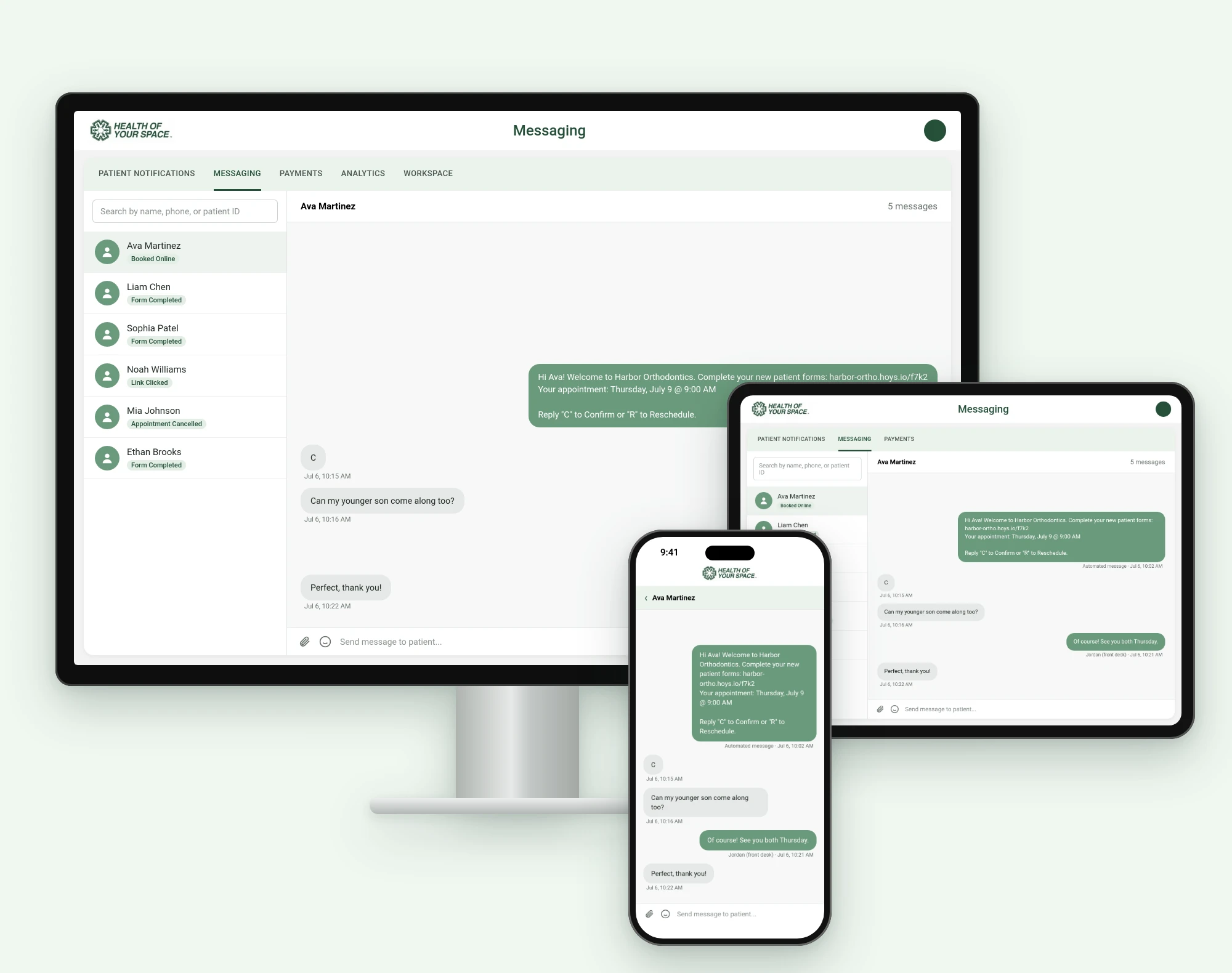
A real inbox, not a broadcast tool
Staff get a Twilio-backed inbox. Patients reply by text. There is no in-portal chat window to monitor.
Staff inbox
- 01Search patients and open a conversation thread
- 02Mark threads read or unread
- 03Send photos, videos, PDFs, and emojis
- 04Threads sit alongside the patient record
Patient side
- 01Confirm an appointment by texting C, CONFIRM, or CONFIRMED
- 02SMS STOP and START for operational opt-out and opt-in
- 03Replies land with the right patient automatically
The default staff home is an operational table
Team members search patients, filter by date and column, see intake status, send or resend forms, and open the full patient record.
See it running against your Dolphin data.
A demo covers intake, the Dolphin write-back, messaging, online scheduling, and payments, mapped to how your offices actually work.